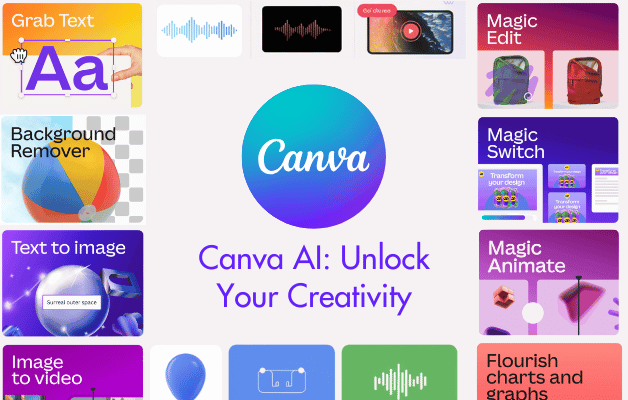
Canva AI is transforming the way we create, and this course will show you how to use it to its full potential. Whether you're a marketer, business owner, content creator, or designer, this hands-on course will equip you with the practical AI skills to create faster, smarter and with more impact.

You will learn to generate and refine content including images, text, videos, data visualisations, and interactive elements using Canva’s most powerful AI tools. The course covers working with Magic Studio, Magic Write, Canva Sheets, and other AI-powered features to produce high-quality, on-brand content efficiently and creatively.

By the end of this course, you will:

  • Confidently use Canva’s AI tools to streamline and elevate your design process.
  • Create intelligent prompts to generate high-quality, on-brand content.
  • Work with Magic Studio, Magic Write, Canva Sheets, and other AI features.
  • Produce and optimise designs for both digital and print platforms.

Prerequisite:

It is recommended that learners complete the Canva Beginner course prior to undertaking Canva AI, to build confidence with Canva’s core features.

Course Details

Download Course PDF
Price
NZ$704
Duration
1 day
Times
9am-4pm
Class Size (max)
8
Class Size (avg)
6
Reference Materials
Provided
CPD Hours
6 hours
Delivery
Instructor-led training
Live Online
Address
Lumify Auckland
Ground Floor
338 Ponsonby Road Ponsonby
Auckland

Course Details

Download Course PDF
Price
NZ$704
Duration
1 day
Times
9am-4pm
Class Size (max)
8
Class Size (avg)
6
Reference Materials
Provided
CPD Hours
6 hours
Delivery
Instructor-led training
Live Online
Address
Lumify Wellington
Level 8
JacksonStone House 11 Hunter Street Wellington CBD

Course Details

Download Course PDF
Price
NZ$704
Duration
1 day
Times
9am-4pm
Class Size (max)
8
Class Size (avg)
6
Reference Materials
Provided
CPD Hours
6 hours
Delivery
Instructor-led training
Live Online
Address
Lumify Christchurch
137 Victoria Street Christchurch Central City Christchurch 8013

Course Details

Download Course PDF
Price
NZ$704
Duration
1 day
Times
9am-4pm
Class Size (max)
8
Class Size (avg)
6
Reference Materials
Provided
CPD Hours
6 hours
Delivery
Instructor-led training
Live Online
Address
Remote Classes
Auckland CBD
Auckland 1010

Upcoming Courses

Auckland

Wellington

Christchurch

Remote NZ

Auckland

We currently have no public courses scheduled. Please contact us to register your interest.

Wellington

We currently have no public courses scheduled. Please contact us to register your interest.

Christchurch

We currently have no public courses scheduled. Please contact us to register your interest.

Remote NZ

We currently have no public courses scheduled. Please contact us to register your interest.

Scheduled
Taking enrollments.
Confirmed
Taking enrollments.
Few Seats left
Book Now.
Sold Out
Try another date.

Canva Training Courses

Course Icon Canva Beginners

Learn Canva essentials in one day. Create professional flyers, social posts and branded designs with our hands-on Canva training course.

download course pdf
Price: NZ$669
Course Icon Canva Intermediate

Take your skills further with our Canva Intermediate course. Explore AI tools, presentations, video editing and website prototyping.

download course pdf
Price: NZ$669
Course Icon Canva Advanced

Master advanced Canva tools in this expert-led training. Manage Brand Kits, use AI for content creation and perfect your design workflows.

download course pdf
Price: NZ$704

Canva AI Course Content

Expand All | Collapse All

Introduction to Canva AI

Discover what Canva AI can do

Design, image, text, video and data generation

Understand the Canva AI interface and how AI credits work

Copyright, privacy and security with AI-generated content

AI Image Generation & Editing

Write image prompts for specific subjects, styles, lighting, settings

Generate branded, stylised images using Magic Media

Use AI tools like Background Remover, Style Match & Magic Studio

Reuse and manage previously generated images efficiently

AI Text Generation & Workflows

Create social media posts, summaries, SEO content, and hashtags

Generate text with specific tone, length, mood and context

Draft Canva Docs, translate content, and refine results with conversation memory

Understand the difference between Magic Write and Canva AI

AI-Powered Data & Visualisation

Generate tabular data and charts in Canva Sheets

Use Magic Formulae and Magic Insights to analyse data

Automate multiple design posts using spreadsheet data

Customise AI-generated charts to match your brand

Generate Interactivity with AI Code

Learn what kind of code Canva AI can generate

Create calculators, interactive web elements and widgets

Embed code into presentations or websites

Access and modify the generated code

AI Video Generation

Prompt for specific video content including mood, camera, dialogue

Generate and edit videos with Canva’s AI tools

Extract audio, tweak visuals, and reuse previous video prompts

Course Wrap-Up & Next Steps

Apply everything with practical prompt engineering skills

Learn where to go next with AI tools, Canva updates and more

Frequently Asked Questions

Who is this Canva AI course for?

This course is ideal for marketers, designers, content creators, educators, entrepreneurs, and anyone using Canva who wants to leverage AI to speed up and enhance their workflow.

Do I need to know how to code?

No coding experience is required. While the course covers Canva AI’s code generation capabilities, it is designed for non-technical users who want to create interactive elements and widgets easily.

What do I need to take part?

All you need is a Canva account (a Pro account is recommended for full access to AI features), a computer or device with internet access, and a willingness to explore new AI tools within Canva.

Will I learn how to write better prompts?

Yes! Prompt engineering is a core part of this course. You'll learn how to structure effective prompts for generating high-quality images, text, videos, and data using Canva’s AI features.

What’s the difference between Canva AI and Magic Write?

Canva AI is a broader suite that includes text, image, video, code, and data generation. Magic Write is a specific feature focused on AI-assisted text creation. This course explains when and how to use each effectively.

Can I automate social media content with Canva AI?

Absolutely. You’ll learn how to use Canva Sheets, Magic Media, and AI-generated text to automate the creation of multiple posts - perfect for batch content production and consistent branding.

Should I complete any other course before doing Canva AI?

Preferably, you should complete our Canva Beginner course before starting Canva AI to ensure you’re confident with the Canva platform and interface.

Course Details

Download Course PDF
Price
NZ$704
Duration
1 day
Times
9am-4pm
Class Size (max)
8
Class Size (avg)
6
Reference Materials
Provided
CPD Hours
6 hours
Delivery
Instructor-led training
Live Online
Address
Lumify Auckland
Ground Floor
338 Ponsonby Road Ponsonby
Auckland

Course Details

Download Course PDF
Price
NZ$704
Duration
1 day
Times
9am-4pm
Class Size (max)
8
Class Size (avg)
6
Reference Materials
Provided
CPD Hours
6 hours
Delivery
Instructor-led training
Live Online
Address
Lumify Wellington
Level 8
JacksonStone House 11 Hunter Street Wellington CBD

Course Details

Download Course PDF
Price
NZ$704
Duration
1 day
Times
9am-4pm
Class Size (max)
8
Class Size (avg)
6
Reference Materials
Provided
CPD Hours
6 hours
Delivery
Instructor-led training
Live Online
Address
Lumify Christchurch
137 Victoria Street Christchurch Central City Christchurch 8013

Course Details

Download Course PDF
Price
NZ$704
Duration
1 day
Times
9am-4pm
Class Size (max)
8
Class Size (avg)
6
Reference Materials
Provided
CPD Hours
6 hours
Delivery
Instructor-led training
Live Online
Address
Remote Classes
Auckland CBD
Auckland 1010

skills test nexacu

Skills Test

Try our short skills test and find out which course is right for you.

 skills test

Locations In-Person & Online

Find the nearest location and date that works for you

Locations In-Person & Online

Find the nearest location and date that works for you

Related Training Courses

Course Icon Canva Beginners

Learn Canva essentials in one day. Create professional flyers, social posts and branded designs with our hands-on Canva training course.

download course pdf
Price: NZ$669
Course Icon Canva Intermediate

Take your skills further with our Canva Intermediate course. Explore AI tools, presentations, video editing and website prototyping.

download course pdf
Price: NZ$669
Course Icon Canva Advanced

Master advanced Canva tools in this expert-led training. Manage Brand Kits, use AI for content creation and perfect your design workflows.

download course pdf
Price: NZ$704

Locations In-Person & Online

Find the nearest location and date that works for you

Locations In-Person & Online

Find the nearest location and date that works for you

Trusted Globally by Leading Organisations

At Nexacu, we are proud to be the trusted training partner for hundreds of leading organisations across Australia, New Zealand, and around the world. From government agencies to multinational corporations, we help teams build practical skills and achieve real outcomes through expert-led training.

  • 400+ companies rely on Nexacu for workforce development
  • Trusted by government agencies at all levels
  • Delivering training across 9 countries and growing

Why Nexacu? 

Books Icon

Step by Step Courseware

Custom workbook included with a step by step exercises

Facility Image 2
Facility Image 3
Facility Image 1

Refresh Icon

Free Refresher

Resit your course for free within 6 Months

Trusted by Business

Trusted by Business

Procured by Government

Procured by Goverment

Reviews Not Found

Valued by Individuals