Recent Searches
Category

Microsoft Power BI

Category

Microsoft Excel

Category

Microsoft Copilot Courses

Category

SharePoint

Category

Professional Development

Category

Microsoft Project

Category

Power Automate

Category

Power Apps

Category

AI for Business

Category

SQL

Category

Microsoft Office 365

Category

Microsoft Word

Category

Python

Category

Microsoft Teams

Category

Excel Specialist

Category

Microsoft PowerPoint

Category

Microsoft Outlook

Category

R Programming

Category

Microsoft Access

Category

Microsoft Visio

Category

WordPress

Category

Adobe InDesign Courses

Category

Canva Courses

Category

Microsoft Access (1)

Category

Webinars Old

Course

Power BI Beginner

Course

Excel Beginner

Course

Copilot for M365

Course

SharePoint Beginner

Course

Achieving Leadership & Success

Course

Project Beginner

Course

Power Apps Beginner

Course

ChatGPT Beginner

Course

SQL Beginner

Course

Word Beginner

Course

Python Basics

Course

Teams Essentials

Course

Financial Modelling

Course

PowerPoint Level 1

Course

Microsoft Outlook Beginner to Intermediate

Course

R Programming Beginner

Course

Microsoft Access Essentials

Course

Visio Essentials

Course

WordPress Essentials

Course

InDesign Lite

Course

Canva Beginners

Course

Build Your EQ Power: Practical Skills for Everyday Work

Course

Power BI Intermediate

Course

Excel Intermediate

Course

Copilot for Word

Course

SharePoint Intermediate

Course

Project Intermediate

Course

Power Apps Intermediate

Course

SQL Intermediate

Course

Word Intermediate

Course

Python Intermediate

Course

Analysis and Dashboards

Course

PowerPoint Level 2

Course

R Programming Intermediate

Course

Microsoft Access Advanced

Course

InDesign Training Intro

Course

Canva Intermediate

Course

Practical Project Management Webinar

Course

Power BI Advanced

Course

Excel Advanced

Course

Copilot for Excel

Course

SharePoint Advanced (Site Owner)

Course

Project Advanced

Course

Power Apps Advanced

Course

SQL Advanced

Course

Word Advanced

Course

Python Advanced

Course

Excel VBA

Course

R Programming Advanced

Course

InDesign Training Advanced

Course

Canva Advanced

Course

Minutes Taking Webinar

Course

Power BI DAX

Course

Excel Expert

Course

Copilot for PowerPoint

Course

SharePoint Advanced

Course

Machine Learning in R

Course

Maximising Your Copilot Investment: Turning AI into Real Productivity Gains

Course

Copilot for Outlook and Teams

Course

AI in the Workplace Webinar

Course

Writing Great Prompts for AI

Course

Inclusive App Development with Power Apps

Course

Power Automate Beginner

Course

Power Automate Intermediate

Course

Microsoft Outlook Advanced

Course

Power Automate Advanced

Course

Power Apps Intermediate | Power Automate + Power BI Integration

Course

AI Prompting Fundamentals

Course

Microsoft 365 Essentials

Course

Excel Tables and Pivot Tables

Course

Data Transformation with Power Query

Course

Excel Macro Mastery

Course

Power BI Desktop Advanced Reporting

Course

AI for Business Leaders and Managers

Course

Data Visualisation with Power BI Desktop

Course

AI for Business Leaders

Course

Anger Management & Negotiation Skills

Course

Assertiveness & Confidence

Course

Building Resilience

Course

Coaching and Mentoring

Course

Communications

Course

Communications & Quality Client Service Training

Course

Critical Thinking and Problem Solving

Course

Cultural Diversity in the Workplace

Course

Embracing Change

Course

Growing Emotional Intelligence

Course

Minute Taking

Course

Persuasion and Negotiation Skills

Course

Presentation Skills and Public Speaking

Course

Practical Project Management

Course

Respect, Equity and Diversity (RED)

Course

Resumé Writing and Interview Skills

Course

Stress Management

Course

Team Leadership, Management and Development

Course

Time Management Intensive

Course

Train the Trainer

Course

Write Effective Business Documents

Course

Dealing with Difficult People

Course

Managing Difficult Conversations

Course

Managing the Virtual Workplace

Microsoft 365 Essentials Course

Build practical Microsoft 365 skills for communication, collaboration and productivity

Build confidence using Microsoft 365 with Nexacu’s Microsoft 365 Essentials course. This practical, one-day training course is designed for beginners and organisations that are new to Microsoft 365 or require post-implementation training.

Through hands-on activities, you will learn how to communicate, collaborate and manage files using Teams, Outlook, OneDrive and SharePoint. You will also explore Forms, Planner, OneNote and Loop, along with practical uses of Copilot Chat for drafting emails, summarising documents and streamlining everyday tasks.

By the end of this Microsoft 365 course, you will:

  • Navigate Microsoft 365 and understand its core apps and features.
  • Communicate and collaborate effectively using Outlook and Teams.
  • Store, share and manage files securely with OneDrive and SharePoint.
  • Use productivity apps including Forms, OneNote, Planner and Loop.
  • Apply Copilot Chat responsibly to draft content, summarise information and improve productivity.

Prerequisite:

No prior Microsoft 365 knowledge is required. This course is suitable for beginners, organisations that are new to Microsoft 365 and teams completing post-implementation training.

Read more about this Microsoft 365 Essentials course

Microsoft 365 Essentials is designed for people who need a practical introduction to the applications and services used across the Microsoft 365 environment. It is suitable for employees, administrators, coordinators, managers and teams transitioning to Microsoft 365.

The course covers communication and collaboration with Outlook and Teams, file storage and sharing with OneDrive and SharePoint, and everyday productivity tools including Forms, Planner, OneNote and Loop. The focus is on practical workplace workflows rather than advanced administration or technical configuration.

Participants also explore practical uses of Copilot Chat, including drafting emails, summarising documents and supporting routine tasks. The course includes guidance on using AI responsibly and reviewing generated content before it is used or shared.

Course Details

Download Course PDF
Price
฿ 10,600
Duration
1 day
Times
9am-4pm
Class Size (max)
10
Class Size (avg)
5
Reference Materials
Provided
CPD Hours
6 hours
Delivery
Instructor-led training
Live Online
Address
N/A

Upcoming Courses

Remote BKK

Remote BKK
Date
Course
City
Status
Tue 20 Oct 26
Tue
20
Oct
Microsoft 365 Essentials
Remote BKK
Status: Scheduled
Scheduled
Scheduled
Taking enrollments.
Confirmed
Taking enrollments.
Few Seats left
Book Now.
Sold Out
Try another date.

Office 365 Training Courses

Office 365 Essentials Course Content

Expand All | Collapse All

Introduction to Microsoft 365

Signing in and navigating office.com

Exploring the homepage: search, app catalogue, user settings, Copilot Chat

Pinning frequently used apps

Benefits of secure cloud file storage

Collaboration with Microsoft Teams

Understanding Teams, Channels, and Chats

Creating teams and adding members

Sensitivity labels and role assignments

Scheduling meetings and using meeting tools (chat, reactions, notes, Copilot, sharing)

Mock meetings and role-play exercises

Communication with Outlook

Inbox and interface walkthrough

Email management: rules, quick steps, workspace organisation

Calendar: scheduling and tracking meetings, tasks, and reminders

Flagging important emails and integrating with Planner

File Management & Sharing

Uploading, creating, and organising files in OneDrive

Setting up folders and naming conventions

Applying filters and file management best practices

SharePoint basics: navigation, libraries, permissions

Securely sharing files and restoring previous versions

Productivity Tools in Microsoft 365

Creating and sharing forms with Microsoft Forms

Setting up and using OneNote notebooks, sections, and pages

Creating and tracking tasks in Planner: assignments, labels, due dates

Introduction to Loop for real-time collaboration

Syncing notes and tasks across apps

Copilot Chat (AI Assistance)

Introduction to Copilot Chat and licence types

Effective prompting: goals, context, expectations

Exercises: drafting emails, summarising documents, listing project risks

Recognising limitations and verifying AI outputs

Wrap Up & Assessment

Review of key concepts from each module

Group challenges and troubleshooting

Scenario-based quizzes

Further resources for continued learning

Frequently Asked Questions

What is Microsoft 365?

Microsoft 365 is Microsoft's suite of productivity tools designed to help you achieve more in the workplace. It includes the well know apps of Excel, Word, and PowerPoint but features many more useful applications such as Teams, Planner, Forms, SharePoint Online. Office 365 applications are cloud-based, so users can access their files and content from anywhere and on any device. They can collaborate on files and documents and store this shared copy in a shared directory. 

Will the content in these Microsoft 365 courses be relevant for the workplace?

Yes, our course writers and trainers have industry backgrounds. Our core principle is to deliver training that our students can not only use in the workplace but will actually drive increased efficiency and productivity gains. We teach the key elements of Office 365 from Beginner to Advanced. Every organization deploys and uses Office 365 differently but the core concepts are similar. Learning to use the range of applications will present opportunities to craft your own solutions and process improvements. 

What is Remote Training?

Remote training at Nexacu means our experienced trainers will deliver your training virtually. Students can access our usual classroom training courses via video conferencing, ask questions, participate in discussions, and share their screen with the trainer if they need help at any point in the course. Students have the same level of participation and access to the trainer as they would in classroom training sessions. 

What is the difference between Microsoft 365 and Office 365?

Microsoft 365 is the rebranded version of Office 365. What was previously referred to as Office 365 is now called Microsoft 365. If the name Office 365 is mentioned, it is generally in reference to only Microsoft's 'core' apps - Excel, PowerPoint, and Word. These three applications are included in Microsoft 365 along with many others such as Teams, Planner, Forms, SharePoint Online.

How can I prepare for my online course?

Install the Microsoft Teams desktop application.

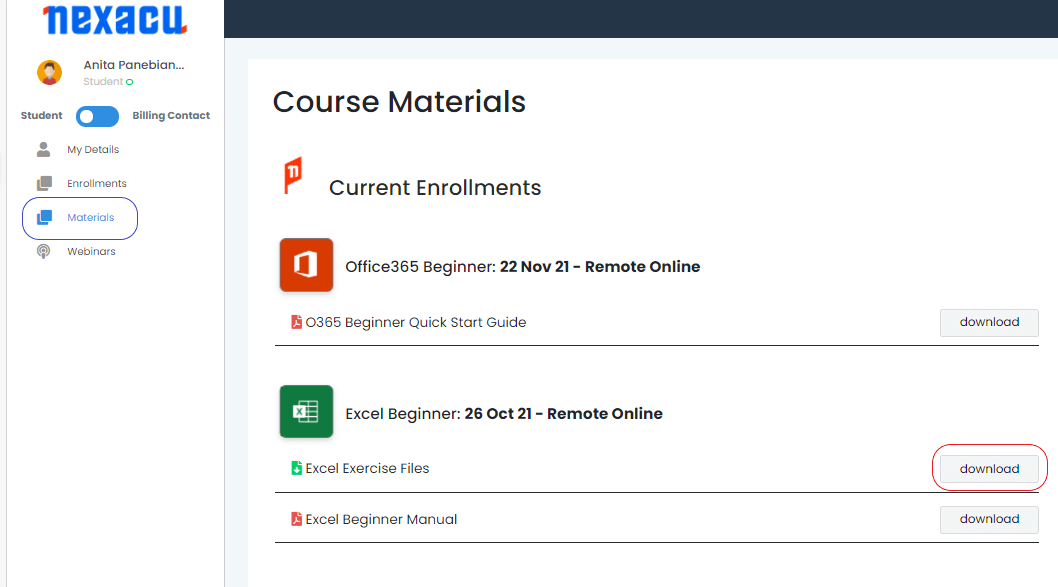
For the advanced course, you are required to download and unzip files. To do this, log in to your student portal and click on the "Materials" tab.

materials tab Nexacu Hub

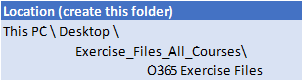
Download your exercise files and extract them to the folder specified below. Note you will have to create the folder first. 

exercise files

Course Details

Download Course PDF
Price
฿ 10,600
Duration
1 day
Times
9am-4pm
Class Size (max)
10
Class Size (avg)
5
Reference Materials
Provided
CPD Hours
6 hours
Delivery
Instructor-led training
Live Online
Address
N/A

skills test nexacu

Skills Test

Try our short skills test and find out which course is right for you.

 skills test


Locations In-Person & Online

Find the nearest location and date that works for you

Locations In-Person & Online

Find the nearest location and date that works for you

Related Training Courses

Locations In-Person & Online

Find the nearest location and date that works for you

Locations In-Person & Online

Find the nearest location and date that works for you

Trusted Globally by Leading Organisations

At Nexacu, we are proud to be the trusted training partner for hundreds of leading organisations across Australia, New Zealand, and around the world. From government agencies to multinational corporations, we help teams build practical skills and achieve real outcomes through expert-led training.

  • 400+ companies rely on Nexacu for workforce development
  • Trusted by government agencies at all levels
  • Delivering training across 9 countries and growing

Why Nexacu? 

step by step courseware

Step by Step Courseware

Custom workbook included with a step by step exercises

Facility Image 2
Facility Image 3
Facility Image 1

Interactive real time training

Interactive, Real-Time Training

Learn with expert instructors, wherever you are

Trusted by Business

Trusted by Business

Procured by Government

Procured by Goverment

Reviews Not Found

Valued by Individuals